

What is Swytchcode
Swytchcode is a self-hosted execution layer that sits between agents and applications on one side, and the APIs they call on the other. It gives teams one runtime to handle auth, how tools are exposed, which policies apply, and how everything is logged, instead of rebuilding that logic in every project.
Browse the full, up-to-date list of supported APIs at swytchcode.com/apis.
Devs can build reliable AI agents into production with Swytchcode, while it takes care of:
- Secure access - OAuth 2.0, API keys, bearer tokens, credential management, and integrations with enterprise authentication systems. Managed Auth via WorkOS.
- Reliable execution - Automatic retries, idempotency, timeout handling, failure recovery, request validation, and response validation.
- Governance - Policy enforcement, human approval, execution controls, rate limits, usage limits, and explicit control over which tools an agent can invoke.
- Observability - Local audit trails, workspace logs, execution history, request and response logs, metrics, and the context required to reconstruct failures.
- Runtime services - Tool execution, API integrations, and state management through a consistent runtime boundary.
- Self-hosted - The runtime is deployed inside the organization’s own environment. Teams retain control over where agent actions execute, how credentials are managed, which integrations are available, and how logs and policies are stored.
You can use it in two main ways:
- With terminal AI tools such as Cursor, Claude Code, or Windsurf through the CLI and MCP.
- Inside custom applications built with LangGraph, CrewAI, Vercel AI SDK, or the runtime SDKs.
What Swytchcode gives you
- Secure execution: requests go through the CLI, which enforces policies and auth handling.
- Agentic tool calling: tools are exposed in a consistent format for agents and SDKs, as described in Managed Authentication and the Execution Pipeline.
- Native MCP support: connect editors and coding agents directly with MCP.
- Runtime support: use the JavaScript or Python SDKs to wire tools into your app without writing raw HTTP glue.
How requests are executed
Every request follows the same execution flow, regardless of whether it comes from a coding assistant or a custom AI application.
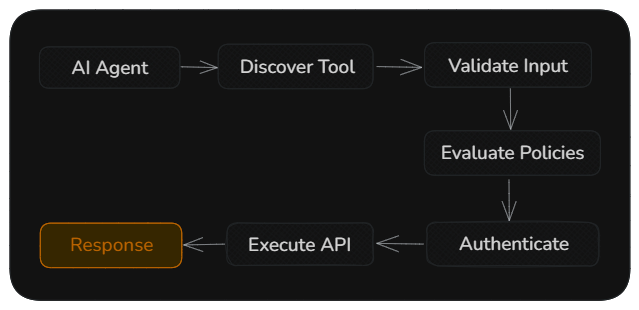
This execution flow is consistent across Cursor, Claude Code, Codex, OpenAI SDK, LangGraph, CrewAI, and other supported integrations.
How developers use Swytchcode
At the core of Swytchcode is the CLI. Everything else builds on top of it.
1. Swytchcode CLI
The primary runtime for managing integrations, credentials, execution, and deployment.
The CLI is the foundation of Swytchcode. It initializes projects, installs integrations, manages tool configuration, evaluates policies, and executes API calls on behalf of your AI workflows.
2. MCP (inbuilt in the CLI)
Expose integrations as tools for AI coding assistants and agentic platforms. MCP is built into the Swytchcode CLI so editors and agents can use the same runtime layer.
Swytchcode MCP works with coding agents such as:
- Cursor
- Claude Code
- Windsurf
- GitHub Copilot
- Gemini CLI
- Codex
- Hermes
- OpenClaw
3. Native SDKs (Swytchcode CLI + runtime SDKs)
Integrate Swytchcode directly into agentic applications using supported frameworks. The runtime SDKs expose native tool calling to these frameworks.
Currently supported:
- OpenAI Agents SDK
- Anthropic SDK
- Vercel AI SDK
- LangGraph
- CrewAI
Runtime SDKs are available for Python and TypeScript (JavaScript), and additional SDKs can be supported as the ecosystem evolves.
What this means for developers
- The CLI runtime is the single source of truth for project state and tool execution.
- MCP lets agents discover and execute tools safely through the CLI.
- Runtime SDKs let developers embed Swytchcode into applications with native tool calling.
Why AI agents need an execution layer
Large language models are good at deciding what they want to do, but they shouldn’t be responsible for deciding how an API should be called.
Without an execution layer, AI agents can:
- Generate incorrect HTTP requests
- Use invalid parameters or payloads
- Retry requests incorrectly
- Execute operations they shouldn’t have access to
- Require custom integration code for every AI framework
Swytchcode separates reasoning from execution. Your AI agent decides what action to perform, while Swytchcode securely handles the execution.
Built for every AI development workflow
Swytchcode supports both interactive AI coding assistants and production AI applications.
| Workflow | Supported integrations |
|---|---|
| Terminal AI agents | Cursor, Claude Code, Windsurf, GitHub Copilot, Gemini CLI, Codex, Hermes, OpenClaw |
| AI frameworks | LangGraph, CrewAI |
| AI SDKs | OpenAI SDK, Anthropic SDK, Vercel AI SDK |
| Runtime SDKs | JavaScript, Python |
No matter how you build AI applications, Swytchcode provides the same execution layer, authentication model, and policy enforcement, making it easy to move from local development to production.
Where to go next
Quickstarts
Get up and running in minutes with the Swytchcode CLI, MCP, or Runtime SDKs.
CLI Overview
Learn how the CLI manages integrations, authentication, tool execution, and your project configuration.
Managed Authentication
Understand how Swytchcode securely manages provider credentials and resolves authentication during execution.
manifest.json
Explore the configuration files that define trusted tools, policies, and execution behavior.
Runtime SDKs
Build AI applications using the JavaScript and Python Runtime SDKs with the same execution engine as the CLI.