

Authentication
Authentication in Swytchcode is divided into two independent authentication planes. Although they both involve credentials, they serve completely different purposes. Understanding the difference is essential before working with integrations, Managed Authentication, or the Execution Pipeline.
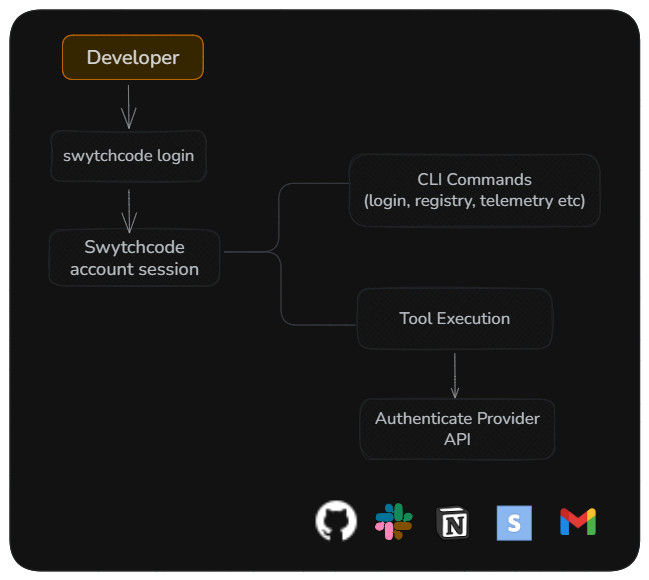
Account authentication identifies who you are to Swytchcode.
Provider credentials authorize what external APIs your agent can access.
Account Authentication
Account authentication is used whenever you interact with Swytchcode itself (see CLI Authentication).
This includes operations such as:
- Logging into the CLI
- Accessing the Swytchcode registry
- Checking your account
- Downloading integrations
- Upgrade approvals
- Telemetry and account-specific services
- Usage metering against your plan’s monthly live-command limit
It is not used when executing tools against third-party APIs.
You can run your first 2 live commands without signing in. Dry runs, --explain, and demos don’t count toward those 2. After that, run swy login to keep going.
Commands run with an API key (swy_key_...) - typical for agents and CI - don’t count toward your monthly live-command limit. Plan limits are on swytchcode.com/pricing.
Authentication Methods
Swytchcode checks authentication using the following order.
1. Service Token
For automation, CI/CD pipelines, and AI agents, Swytchcode first checks for a service token.
SWYTCHCODE_TOKENThis token is read directly from the process environment. Values typically start with swy_key_.... Commands run with an API key don’t count toward your monthly live-command limit.
Swytchcode intentionally does not load this value from a project .env file, making it suitable for secure deployment environments.
2. User Session
If no service token is available, Swytchcode falls back to the local user session created during login.
A session is created using:
swy loginswy login --open # also opens the browser automaticallyThe CLI authenticates using a secure OAuth device flow and saves the session to ~/.swytchcode/auth.json. You can sign in through the CLI or visit app.swytchcode.com to manage your account in the browser.
The session automatically refreshes when required, allowing you to continue working without repeatedly logging in.
Authentication Commands
The CLI provides several commands for managing your account authentication.
| Command | Purpose |
|---|---|
swy login | Sign in to your Swytchcode account (or visit app.swytchcode.com). |
swy logout | Remove the current local session. |
swy whoami | Display the active authentication state. |
Provider Credentials
Provider credentials are completely separate from your Swytchcode account.
They are only used when executing tools against external services.
For example:
- GitHub
- Stripe
- Slack
- Gmail
- Notion
- HubSpot
- Twilio
When your AI agent executes a tool, Swytchcode resolves the required provider credentials before sending the request.
Your Swytchcode account credentials are never used to authenticate requests to external providers.
Provider credentials are managed with a separate set of commands from account authentication:
| Command | Purpose |
|---|---|
swy auth connect [provider] | Connect a provider account or API key (OAuth flow or inline prompt). With no argument, lists which providers your installed integrations still need. |
swy auth status | List connected provider accounts (aliases: list, ls). |
swy auth disconnect <provider> [--local] | Disconnect a provider’s connected account. |
The full connect/disconnect workflow, including how OAuth vs. API-key providers differ, is covered in Managed Authentication. Crypto exchanges, which need every request signed, are covered in Signed requests.
Workspaces
A workspace is where your providers, connected accounts, logs, and approval settings live. Every account has a personal workspace. A team is a shared workspace on plans that include team seats. Full details are in Workspaces and teams.
Choosing a project’s workspace is separate from signing in and connecting providers, and has its own command, swy workspace. A project names its workspace in .swytchcode/tooling.json, so everyone with a copy of the project uses the same one. To change it:
swy workspace use <name>See Which workspace a project uses for how it’s picked, and Workspaces and teams for roles, logs, and invitations.
Credential Resolution
When a tool executes, Swytchcode resolves provider credentials using a predictable priority order.
Environment Variables │ ▼Managed Credential Store (/guides/managed-authentication/) │ ▼Project .envThe first valid credential found is used.
This resolution order makes it easy to override credentials in CI while still supporting local development.
Environment Variables
Environment variables have the highest priority.
This is the recommended approach for:
- Production deployments
- CI/CD pipelines
- Secret management systems
- Containerized applications
Managed Credential Store
Swytchcode provides an encrypted local credential store for securely managing provider credentials.
Credentials stored here can be reused across multiple projects without placing secrets inside your project directory.
The managed credential store is covered in detail in the Managed Authentication guide.
Project .env
During local development, credentials can also be loaded from the project’s .env file.
This provides a convenient development experience while keeping production deployments separate.
See Setting SWYTCHCODE_TOKEN in the CLI reference for recommended patterns and examples.
Authentication During Execution
Authentication happens automatically whenever a tool executes.
AI Agent │ ▼Select Tool │ ▼Resolve Provider Credentials │ ▼Authenticate Request │ ▼Execute API │ ▼Return ResponseThe runtime automatically determines which credentials should be used for the requested provider before making the API call. For providers that sign requests (crypto exchanges), “Authenticate Request” signs each attempt just before it is sent, so a retry or a request sent after an approval wait carries a fresh timestamp.
Authentication Best Practices
Follow these recommendations when working with authentication:
- Keep your Swytchcode account separate from provider credentials.
- Use environment variables for production deployments whenever possible.
- Store reusable local credentials in the managed credential store instead of project files.
- Never commit secrets to source control.
- Rotate provider credentials regularly.
- Grant only the minimum permissions required for your application.
- Use separate credentials for development and production environments.
Next Steps
Managed Authentication
Learn how Swytchcode securely stores, resolves, and manages provider credentials during tool execution.
Execution Pipeline
See how every tool execution flows through validation, authentication, policies, retries, and API execution.
CLI Authentication
Explore the CLI authentication model, including account login, provider authentication, and credential resolution.
Workspaces and teams
Personal and team workspaces, roles, logs, and pinning a project.
Pricing
Plan limits and billing.